

Implementation, synchronization and API integration Shopify
We integrate Shopify with CRM, ERP, inventory and accounting systems, shipping providers, payment platforms, and other services. We automate order transfers, product synchronization, inventory updates, pricing, customer data, and fulfillment statuses. We can use an existing integration workflow or develop a custom API integration tailored to your online store processes.
What can be automated with Shopify
When making a purchase, we guarantee that your task will be completed, up to engaging our developers to implement your task.
Integration & Connectors Shopify with: Google Sheets, Telegram, Wordpress Woocommerce, Etsy, Suppliers, Other integrations
HubSpot integration with Shopify allows you to combine CRM, marketing, and an online store into a single sales management system.
The solution automates order transfer, customer synchronization, and product management between the Shopify e-commerce platform and HubSpot CRM.
Integration helps companies manage sales more effectively, analyze customer behavior, and create personalized marketing campaigns based on online store data.
Google Sheets and Shopify integration allows you to connect your Shopify store with a Google Sheets spreadsheet. This integration allows you to easily transfer data from your Shopify store to a Google Sheets spreadsheet, and vice versa.
For example, you can use this integration to automatically track and update information such as your sales data, product details, customer information, and more. This makes it easy for you to access, analyze, and use this data for various purposes, such as for creating reports, tracking inventory, or automating business processes.
Basic integration allows:
- transfer information and orders to Google Spreadsheet;
- transfer product information from Google tables to Shopify;
Custom integration implies the possible implementation of both a part of a task and more detailed automated actions between two services.
The integration fee is a one-time fee. Hosting is required for the integration to work.
Overall, the Google Sheets and Shopify integration provides a convenient and efficient way to manage and analyze your store's data, helping you make data-driven decisions and streamline your business processes.
Integration deadline: up to 15 business days
POSSIBILITIES OF THE ONLINE STORE IN TELEGRAM
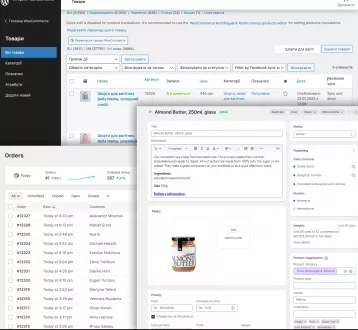
Shopify and WooCommerce are two popular e-commerce platforms that allow businesses to build and manage online stores. While both platforms have their own strengths and weaknesses, integration between the two can provide businesses with additional functionality and versatility.
API integrations can allow businesses to seamlessly manage products, orders, and customer data across both platforms.
For example, an integration could allow a business to manage their product inventory in WooCommerce and have that information automatically reflected in their Shopify store. This can save time and reduce the risk of errors that can occur when manually updating two separate systems.
Integration between Shopify and WooCommerce can also allow businesses to take advantage of the unique features offered by each platform. For instance, a business could use WooCommerce for its robust shipping and tax options, and Shopify for its easy-to-use checkout and payment processing.
Overall, integrating Shopify and WooCommerce can provide businesses with a powerful e-commerce solution that combines the best of both platforms. However, it's important to carefully consider the specific needs of a business before deciding to integrate the two systems, as this can require a significant investment of time and resources.
Payment for integration is one-time. You will need hosting for the integration to work permanently.
Automatic connector Shopify to Etsy. Integrate products from Shopify to Etsy.
One-time payment. Runs on the client's hosting.
Shopify and Suppliers integration allows you to upload a product line to your site
Integration deadline: up to 7 business days
* The indicated price is approximate and may change depending on the specific project requirements. This is the base price for the listed functionality. To receive an exact estimate, please contact us.
If you have a problem with the use of this or that product - contact support, we guarantee you the implementation of your task.
What can be automated with Shopify
- Orders: Shopify → CRM / ERP / accounting system.
- Products: CRM / ERP / inventory system → Shopify.
- Inventory: automatic synchronization of available product quantities.
- Prices: synchronization of retail, wholesale, and promotional prices.
- Customers: transfer of contact details, addresses, and order history.
- Statuses: CRM / accounting system → Shopify.
- Shipping: automatic shipment creation and tracking number updates.
- Payments: transfer of payment, refund, and transaction data.
- Fiscalization: Shopify → online cash register or receipt generation service.
When making a purchase, we guarantee that your task will be completed, up to engaging our developers to implement your task.
Integration & Connectors Shopify with: Google Sheets, Telegram, Wordpress Woocommerce, Etsy, Suppliers, Other integrations
Shopify |
HubSpot integration with Shopify
HubSpot integration with Shopify allows you to combine CRM, marketing, and an online store into a single sales management system.
The solution automates order transfer, customer synchronization, and product management between the Shopify e-commerce platform and HubSpot CRM.
Integration helps companies manage sales more effectively, analyze customer behavior, and create personalized marketing campaigns based on online store data.
Shopify + Google Sheets |
 |
Google sheets Shopify Integration
Google Sheets and Shopify integration allows you to connect your Shopify store with a Google Sheets spreadsheet. This integration allows you to easily transfer data from your Shopify store to a Google Sheets spreadsheet, and vice versa.
For example, you can use this integration to automatically track and update information such as your sales data, product details, customer information, and more. This makes it easy for you to access, analyze, and use this data for various purposes, such as for creating reports, tracking inventory, or automating business processes.
Basic integration allows:
- transfer information and orders to Google Spreadsheet;
- transfer product information from Google tables to Shopify;
Custom integration implies the possible implementation of both a part of a task and more detailed automated actions between two services.
The integration fee is a one-time fee. Hosting is required for the integration to work.
Overall, the Google Sheets and Shopify integration provides a convenient and efficient way to manage and analyze your store's data, helping you make data-driven decisions and streamline your business processes.
Integration deadline: up to 15 business days
235€*
Shopify + Telegram |
 |
Telegram bot with products from Shopify
POSSIBILITIES OF THE ONLINE STORE IN TELEGRAM
- Creating your own Telegram bot menu;
- Different types of Telegram bot menu;
- Custom banners for key application pages;
- Syncing data of Shopify products with Telegram bot ;
- Uploading product collections to Telegram bot ;
- Receiving Orders from Telegram bot to the Shopify backoffice;
- Completing an order based on your Shopify store's shopping cart
Shopify + Wordpress Woocommerce |
 |
Shopify Woocommerce integration
Shopify and WooCommerce are two popular e-commerce platforms that allow businesses to build and manage online stores. While both platforms have their own strengths and weaknesses, integration between the two can provide businesses with additional functionality and versatility.
API integrations can allow businesses to seamlessly manage products, orders, and customer data across both platforms.
For example, an integration could allow a business to manage their product inventory in WooCommerce and have that information automatically reflected in their Shopify store. This can save time and reduce the risk of errors that can occur when manually updating two separate systems.
Integration between Shopify and WooCommerce can also allow businesses to take advantage of the unique features offered by each platform. For instance, a business could use WooCommerce for its robust shipping and tax options, and Shopify for its easy-to-use checkout and payment processing.
Overall, integrating Shopify and WooCommerce can provide businesses with a powerful e-commerce solution that combines the best of both platforms. However, it's important to carefully consider the specific needs of a business before deciding to integrate the two systems, as this can require a significant investment of time and resources.
Payment for integration is one-time. You will need hosting for the integration to work permanently.
196€*
Shopify + Etsy |
 |
Integrate Shopify with Etsy
Automatic connector Shopify to Etsy. Integrate products from Shopify to Etsy.
One-time payment. Runs on the client's hosting.
157€*
Shopify + Suppliers |
Shopify and Suppliers Integration
Shopify and Suppliers integration allows you to upload a product line to your site
Integration deadline: up to 7 business days
59€*
Other integrations with Shopify
We can also connect Shopify to other CRMs, accounting systems, delivery services, spreadsheets, bots, or internal systems. If the service you need is not on the list, send a request and we will check the API and suggest a realistic integration option.
| Integration direction | What we automate | Price | |
|---|---|---|---|
| Shopify + Shopify and Quickbooks integration | Інтеграція Shopify та QuickBooks Online автоматизує замовлення, інвойси, облік і синхронізацію. | from 235 € | Order |
| Shopify + Erply and Shopify integration | Інтеграція Erply та Shopify автоматизує товари, варіації, ціни, залишки, клієнтів і замовлення. | from 196 € | Order |
See also:
Other configuration services Shopify
Other configuration services Shopify
* The indicated price is approximate and may change depending on the specific project requirements. This is the base price for the listed functionality. To receive an exact estimate, please contact us.
If you have a problem with the use of this or that product - contact support, we guarantee you the implementation of your task.

Free consultation
Take the first step
Start the evaluation and implementation process