

CiFrame connects your website to a CRM to transfer leads, orders and customers. Where supported, we also connect accounting software and synchronize products, prices, stock and statuses.
- Transfer data without manual copying
- Ready-made modules or custom development
- Agreed data exchange rules
Tell us your website, CRM and required data flow. We will assess the implementation approach and scope.
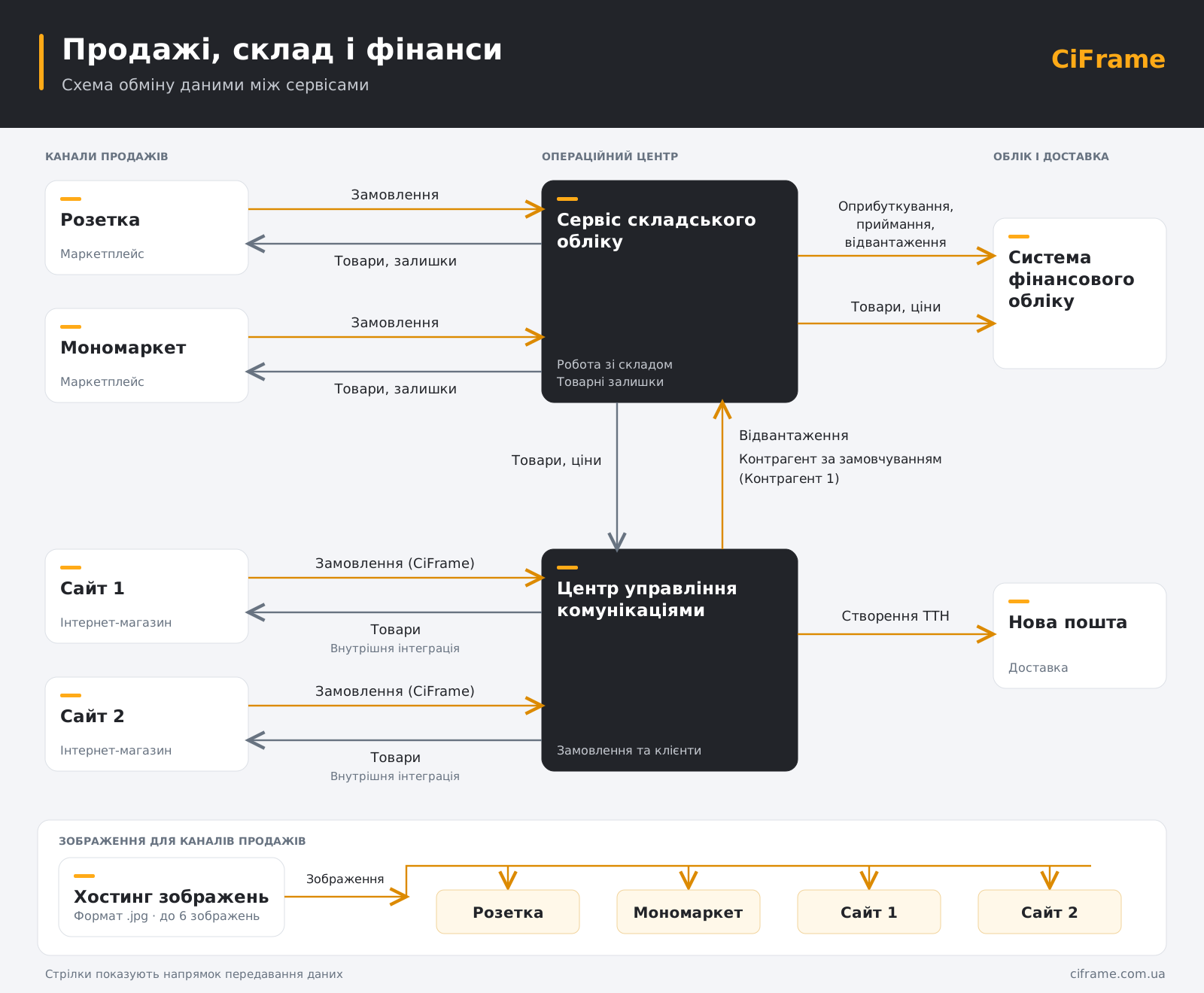
What should the integration achieve?
Send website leads to a CRM
Create a lead, contact or deal from form submissions. Transfer agreed fields and the enquiry source where collected.
Process store orders in a CRM
Transfer order items, contacts, delivery and available payment data. Define status updates and protection against duplicate records.
Connect your store, CRM and accounting
Agree which system owns the master data, how prices and stock update, and which records are created in accounting.
Which data can be synchronized?
Data exchange can use APIs, webhooks, existing modules or files. Available fields and directions depend on the platforms.
| Data | Typical direction | What we clarify |
|---|---|---|
| Leads and contacts | Website → CRM | Fields, source and matching existing contacts |
| Orders | Store → CRM | Variants, discounts, delivery and order changes |
| Statuses | CRM → website or both ways | Status mapping, permitted transitions and loop prevention |
| Prices and stock | Accounting/CRM → store | Master source, warehouses, reservations and frequency |
| Product catalog | Master source → other system | SKUs, variants, categories, images and fields |
| Payments and refunds | Depends on the systems | Partial payments, transaction IDs and data access |
These are possible scenarios. A system appearing in the catalog does not guarantee every feature or field on every plan.
Websites, CRMs and accounting systems
We review existing solutions and your systems’ API capabilities. If a standard module is insufficient, we assess extensions or a custom integration. These are examples, not a promise of a ready-made connector for every pair.
Websites and stores
WooCommerce · Shopify · OpenCart · Horoshop
CRM
KeyCRM · Zoho CRM · Pipedrive · KeepinCRM
Accounting
Dilovod · Bimp · QuickBooks
Agree what happens when an exchange fails
- Define the master source for each data type.
- Agree retries and duplicate detection where supported.
- Define logs and failure notifications within the agreed scope.
- Test agreed scenarios before launch.
How order processing can work
- A customer places an order in the store.
- Agreed order data reaches the CRM with linked records.
- A manager processes the order; permitted status changes return to the website.
- If accounting is connected, orders and stock follow separately agreed rules.
The manager does not have to re-enter the agreed data in several systems.
How much does website CRM integration cost?
Cost depends on the systems, data and exchange rules. An estimate requires your website address, CRM name and a brief task description.
| Option | When it fits | What we assess |
|---|---|---|
| Existing solution | A module covers your workflow | Compatibility, configuration, license and testing |
| Integration extension | Additional fields or rules are needed | The gap between existing features and requirements |
| Custom integration | No suitable standard solution exists | APIs, exchange logic, volume and error handling |
Hosting, ongoing support, third-party licenses and paid APIs are agreed separately. Not all projects require these costs.
Estimate my integrationHow we connect your systems
- Clarify the task: systems, data, directions and expected outcome.
- Technical review: APIs, plans, modules and constraints.
- Agreement and implementation: scope, cost, timeline and acceptance criteria.
- Testing and launch: scenarios, instructions and support terms.
A few frequently asked questions
-
Yes, where the website and CRM provide the required data access. We check the CMS, modules and APIs. A complete website rebuild is not always necessary.
-
Lead transfer typically covers form fields. Stores can also require items, variants, discounts, delivery, payments and statuses. We agree the scope separately.
-
An API is one option. Modules, webhooks or XML/CSV may also work. If the required data is inaccessible, the scenario may need a different approach or may be impossible.
-
Yes, for operations supported by both systems. We define master sources, permitted changes and conflict rules.
-
Orders are typically transferred every 5 minutes, and products are updated every 20 minutes. Intervals depend on the volume and structure of the data; we agree the exact schedule for your integration.
-
We estimate after reviewing the systems. Modules, scenarios, data quality, access and testing affect the timeline.
-
We first review the implementation, access and problem. Diagnostic terms are agreed before work begins.
-
Defect correction and ongoing support terms are defined separately. Monitoring, hosting and API change adaptation are included only where agreed.
